Reducing Return Processing Effort by 23% Through ERP
Workflow Redesign
Reducing Return Processing Effort by 23% Through ERP Workflow Redesignt

Industry
E-Commerce
Service
ERP
Role
UI/UX Designer
Date
12th October, 2025
Overview
Standardize Return Workflows
Enhance Operational Efficiency
Improve Data Accuracy
Facilitate Communication
Ensure Financial Integrity
Increase Customer Satisfaction
Users initial expectations when landing on this module
Error-Free Processing
Complete returns without calculation or refund mismatches.
Clear Confirmation
Proper success messages to ensure confidence in completed returns.
Clear & Intuitive UI
Simple layout that avoids confusion between fields and actions.
Smooth Navigation
Easy step-by-step flow with the ability to go back without getting stuck.
What prompted the page redesign?
The redesign aimed to modernize the UI, simplify complex workflows, improve system feedback and error prevention, and streamline the interface by removing redundant features—ultimately reducing user friction and improving operational efficiency.
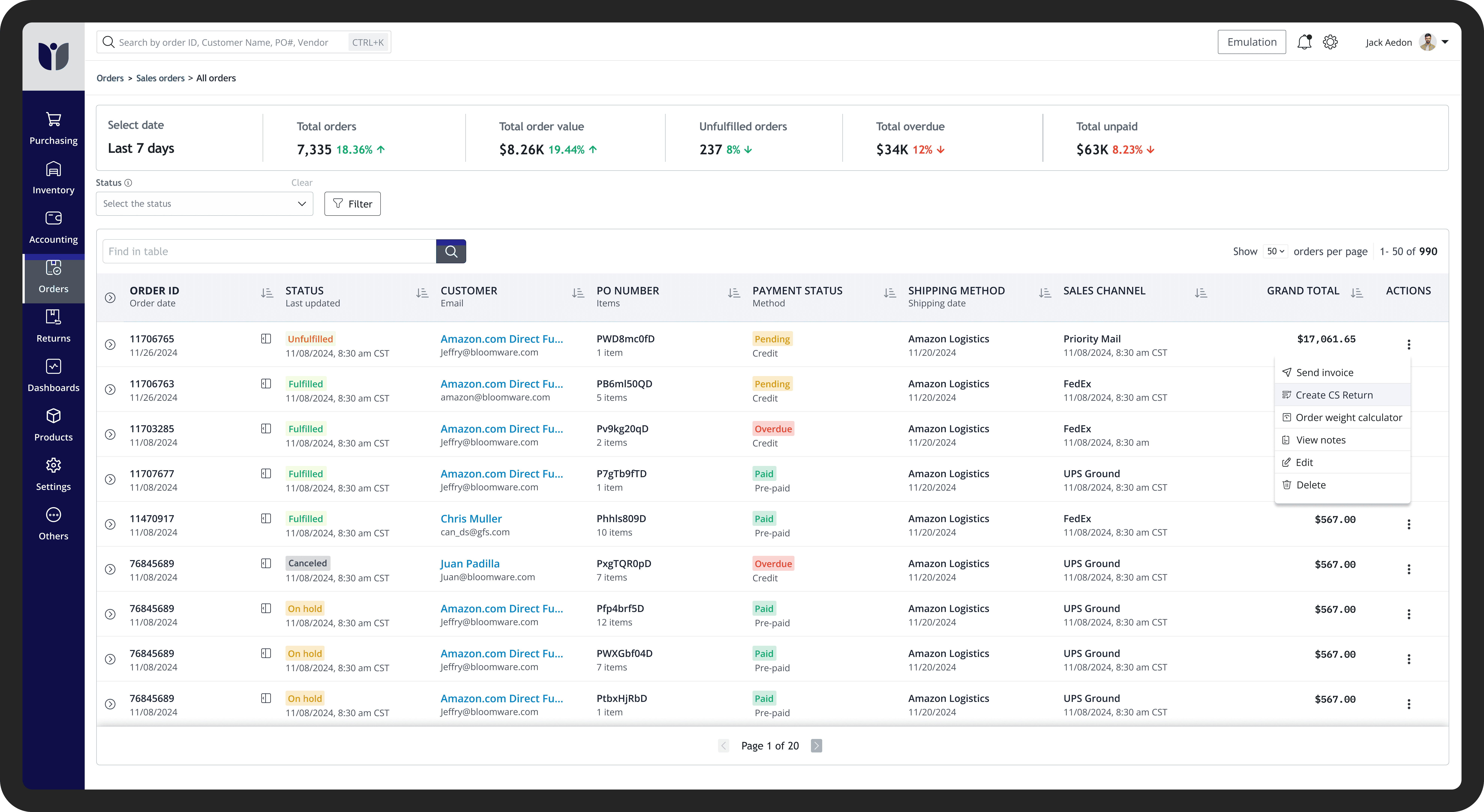
The redesign aimed to modernize the UI, simplify complex workflows, improve system feedback and error prevention, and streamline the interface by removing redundant features—ultimately reducing user friction and improving operational efficiency. Few of the changes are listed below:
Old Screens


01
Explain core benefits
The system needed to guide CS, AR, and Warehouse teams through a clear, structured workflow, reducing confusion while maintaining consistency with familiar 2.0 design patterns.
02
Alignment and information clarity
Improved visual alignment and information hierarchy to clearly indicate where actions lead, with highlighted interactions and disabled states to prevent incorrect clicks.
03
Recognition over Recall
Optimized the UI so CS and AR teams can quickly recognize key actions and information without recalling legacy workflows, supporting faster processing at scale.
04
Error Prevention
Error Prevention
Introduced contextual validations, warnings, and structured safe defaults to prevent costly operational mistakes in high-volume return processing workflows.


Iteration
Phase 1
Reason behind 1st iteration
Scattered Information and Weak Hierarchy
Information was spread across multiple sections without a clear hierarchy, making it difficult for users to quickly locate critical data and understand priorities.
Unclear and Inefficient Navigation
Navigation paths were not intuitive, and key actions were buried or difficult to discover, causing users to rely on trial-and-error and slowing down workflows.
Inconsistent and Uneven UI
Navigation paths were not intuitive, and key actions were buried or difficult to discover, causing users to rely on trial-and-error and slowing down workflows.


Phase 2
Why it led to second iteration
Redundant and Unused Screens
Unused advanced screens added complexity; order tracking made them redundant.
Need for Stronger Financial Safeguards
Added confirmations and alerts to prevent costly financial errors.
Require direct warehouse return
Added a “Warehouse Return” screen to enable direct drop-offs or warehouse-arranged pickups for nearby customers. This ensures faster coordination, reduced transit time, and smoother return processing.
Warehouse Direct return screens

1
Landing Screen
Added a “Warehouse Return” screen to enable direct drop-offs or warehouse-arranged pickups for nearby customers. This ensures faster coordination, reduced transit time, and smoother return processing.

2
Order Product Selection
This screen displays all products within the selected order, allowing users to choose the items to be returned and proceed to the next step.

3
Add Notes & Confirm Return
This screen allows users to add relevant notes and finalize the process by clicking the “Create Warehouse Direct Return” button.
Users initial expectations when landing on this module
Clear Confirmation
Proper success messages to ensure confidence in completed returns.
Error-Free Processing
Complete returns without calculation or refund mismatches.
Clear & Intuitive UI
Simple layout that avoids confusion between fields and actions.
Smooth Navigation
Easy step-by-step flow with the ability to go back without getting stuck.
Testing and result
Test: A/B testing
Success matric: Return Process Efficiency
Variant A (old design) and Variant B (new design) were tested over a one-month period. The results showed that Variant B improved the return completion flow by 23% with fewer errors compared to Variant A. Additionally, the new design reduced return initiation time, minimized manual customer service follow-ups, and lowered incorrect submissions.


Reducing Return Processing Effort by 23% Through ERP
Workflow Redesign


Overview
Standardize Return Workflows
Enhance Operational Efficiency
Improve Data Accuracy
Facilitate Communication
Ensure Financial Integrity
Increase Customer Satisfaction
Old Screens


01
Explain core benefits
The system needed to guide CS, AR, and Warehouse teams through a clear, structured workflow, reducing confusion while maintaining consistency with familiar 2.0 design patterns.
02
Alignment and information clarity
Improved visual alignment and information hierarchy to clearly indicate where actions lead, with highlighted interactions and disabled states to prevent incorrect clicks.
03
Recognition over Recall
Optimized the UI so CS and AR teams can quickly recognize key actions and information without recalling legacy workflows, supporting faster processing at scale.
04
Error Prevention
Introduced contextual validations, warnings, and structured safe defaults to prevent costly operational mistakes in high-volume return processing workflows.
What prompted the page redesign?
The redesign aimed to modernize the UI, simplify complex workflows, improve system feedback and error prevention, and streamline the interface by removing redundant features—ultimately reducing user friction and improving operational efficiency.
Iteration
Phase 1
Reason behind 1st iteration
Scattered Information and Weak Hierarchy
Information was spread across multiple sections without a clear hierarchy, making it difficult for users to quickly locate critical data and understand priorities.
Unclear and Inefficient Navigation
Navigation paths were not intuitive, and key actions were buried or difficult to discover, causing users to rely on trial-and-error and slowing down workflows.
Inconsistent and Uneven UI
Navigation paths were not intuitive, and key actions were buried or difficult to discover, causing users to rely on trial-and-error and slowing down workflows.


Phase 2
Why it led to second iteration
Redundant and Unused Screens
Unused advanced screens added complexity; order tracking made them redundant.
Need for Stronger Financial Safeguards
Added confirmations and alerts to prevent costly financial errors.
Require direct warehouse return
Added a “Warehouse Return” screen to enable direct drop-offs or warehouse-arranged pickups for nearby customers. This ensures faster coordination, reduced transit time, and smoother return processing.
Industry
E-Commerce
Service
ERP
Role
UI/UX Designer
Date
12th October, 2025

Added a “Warehouse Return” screen to enable direct drop-offs or warehouse-arranged pickups for nearby customers. This ensures faster coordination, reduced transit time, and smoother return processing.
1
Landing Screen

This screen displays all products within the selected order, allowing users to choose the items to be returned and proceed to the next step.
2
Order Product Selection

This screen allows users to add relevant notes and finalize the process by clicking the “Create Warehouse Direct Return” button.
3
Add Notes & Confirm Return
Warehouse Direct return screens
Users initial expectations when landing on this module
Clear Confirmation
Proper success messages to ensure confidence in completed returns.
Error-Free Processing
Complete returns without calculation or refund mismatches.
Clear & Intuitive UI
Simple layout that avoids confusion between fields and actions.
Smooth Navigation
Easy step-by-step flow with the ability to go back without getting stuck.
Testing and result
Test: A/B testing
Success matric: Return Process Efficiency
Variant A (old design) and Variant B (new design) were tested over a one-month period. The results showed that Variant B improved the return completion flow by 23% with fewer errors compared to Variant A. Additionally, the new design reduced return initiation time, minimized manual customer service follow-ups, and lowered incorrect submissions.